
Program your LEGO WeDo, SPIKE and EV3 with blocks, right in the browser
A free Scratch-style block editor with nothing to install, so you can keep using the LEGO hubs you already own in the classroom.
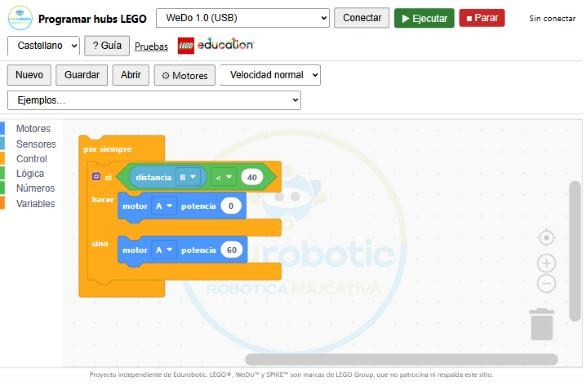
Supported hubs
| Hub | Connection | Status |
|---|---|---|
| LEGO WeDo 1.0 | USB | Verified with a real hub |
| LEGO WeDo 2.0 | Bluetooth | Verified (connection, motor, tilt and light) |
| LEGO SPIKE Prime and Essential | Bluetooth | In testing |
| LEGO MINDSTORMS EV3 | USB and Bluetooth | In testing |
LEGO has discontinued, or is discontinuing, several of these models. This site lets you keep programming them from any computer with Chrome or Edge, without relying on the official apps.
What you can do
- Program with colourful blocks, like in Scratch: motors, sensors, lights, sound, loops, conditions and variables.
- Run the program live and see which block is executing, with a slow speed to explain it in class.
- See the Python code your program generates (SPIKE).
- Load ready-made examples for each hub and save your projects to a file.
- Use it offline once opened, and install it as an app.
- Work in Spanish, Basque or English, with a built-in teacher's guide.
How to start
- Open the editor in Chrome or Edge.
- Pick the hub type and press Connect.
- Drag blocks and press Run.
Requirements
- A computer or Chromebook with Chrome or Edge.
- Firefox, Safari and iPad cannot connect to these hubs.
- The hub with charged batteries.
Frequently asked questions
Do I need to install anything?
No. The editor runs in the browser (Chrome or Edge). Programs are created and run from the page itself.
Which LEGO hubs are supported?
WeDo 1.0 (USB) and WeDo 2.0 (Bluetooth), already verified with real hubs. SPIKE Prime/Essential and EV3 are in testing: they work in simulation but have not yet been verified with a real hub.
Is it free?
Yes, it is free and you do not need to sign up or create an account.
Does it work on iPad or with Safari?
No. Safari, Firefox and iPad/iPhone browsers cannot connect to these hubs. Use Chrome or Edge on a computer, or an Android tablet for the Bluetooth hubs.
Can I use it offline?
Yes. Open it once with internet and it will then work offline. It can also be installed as an app.
Is it affiliated with LEGO?
No. It is an independent project by Edurobotic. LEGO, WeDo, SPIKE and MINDSTORMS are trademarks of the LEGO Group, which does not sponsor or endorse this site.